How to add UTM parameters to email
We are pleased to announce a new feature that allows you to schedule workflow emails, enabling automated and timely communication with your customers. Whether you want to send a gift voucher one day after a customer subscribes or share an ebook after seven days of subscription, this scheduling capability makes it possible.
UTM parameters are simply tags you add to a URL — when your link is clicked, the tags are sent back to Google Analytics and tracked. With UTM parameters, you can tag your links to gauge the effectiveness of your campaigns and identify the best ways to drive more visitors to your website.
Here, utm_source=es and utm_medium=email is automatically set, apart from that utm_campaign is set by you which is your campaign name which you set.
Steps to Add UTM Parameters:
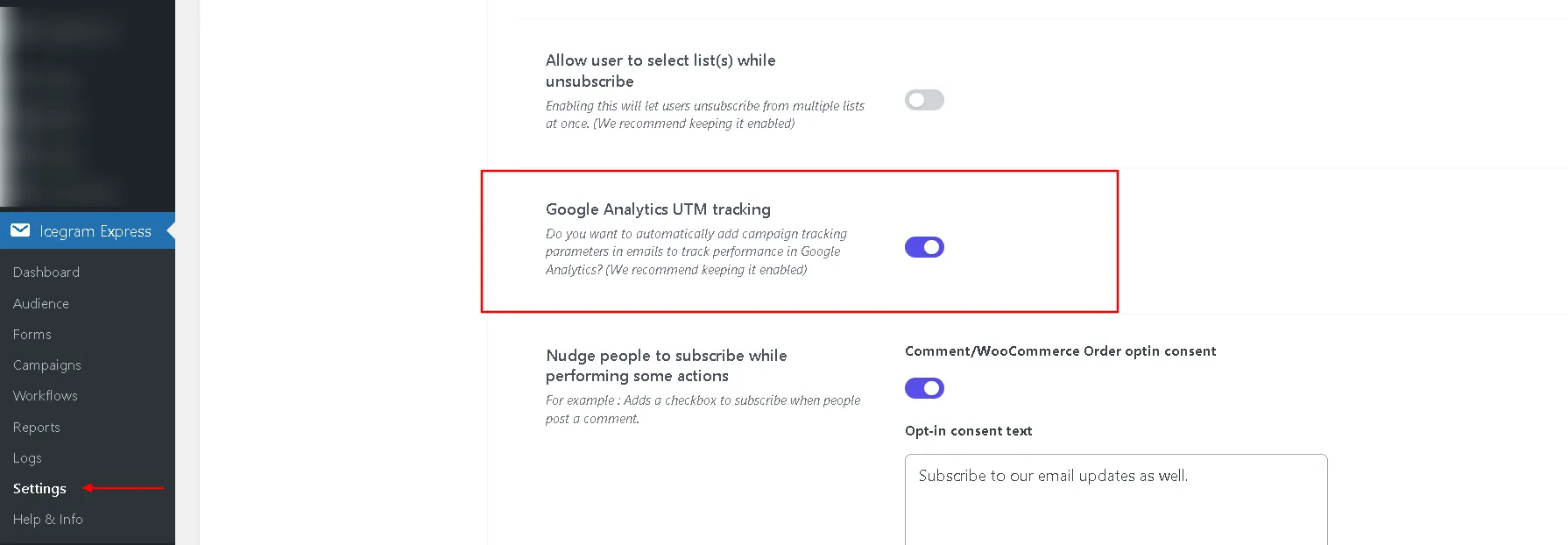
- Navigate to WordPress
Dashboard>Icegram Express>Settings>General. - Scroll down to the "Google Analytics UTM tracking" section in the general settings. This will automatically add campaign tracking parameters to emails for performance tracking in Google Analytics.
- Save the settings. That's it!