
How to Integrate E-goi with Icegram Engage
Connect your E-goi forms within Icegram effortlessly. Simply follow these steps.
Getting Visitors to your e-goi lists with Icegram Engage
Step 1: If you want to add people to your e-goi lists using Icegram Engage, follow these steps.
Step 2: After entering your E-goi account, click to the 'FORM' button present on the main menu bar.
Step 3: Decide on the form that you would like to deploy and click to 'DEPLOY'
Step 4: Click to 'ADD ANOTHER DEPLOYMENT'
Step 5: Next, click HTML
Step 6: Click to 'ADVANCED HTML'
Step 7: A window opens ups with the html snippet in it.
Step 8: Copy paste this html snippet and add it to the 'Embed Form' option of the desired Icegram Engage message type. And follow form embedding steps as usual.
Process in Pictures!
For a better understanding kindly look at the snapshots below.
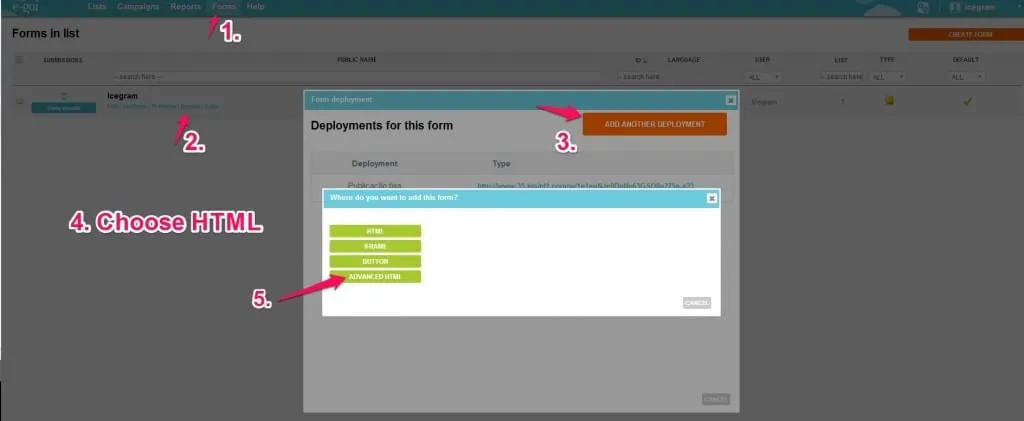 Extracting the HTML code of E-goi forms