How to Target Icegram Engage Campaigns on Custom Post & Page Types
To Target Icegram Campaigns on Custom Post Types, you need to use the functionality "The WildCard Functionality". Follow the steps mentioned in the post.
Steps:
Step 1: Create a new campaign/ edit a previous campaign.
Step 2: Fill in the message content.
Step 3: Start filling the display rules. In the 'WHERE' option select "Specific URL's on this site"
Step 4: Put the url of the custom post type you want the campaign to be shown on.
For example:
Suppose you want to display a campaign only on archived posts.
So you could add the url: www.your-site/archive/*/
This will see to it that the campaign is displayed on every page that has this url.
Step 5: Fill the remaining rules and click to preview.
How to Target Icegram Engage Campaigns on Custom Page Types
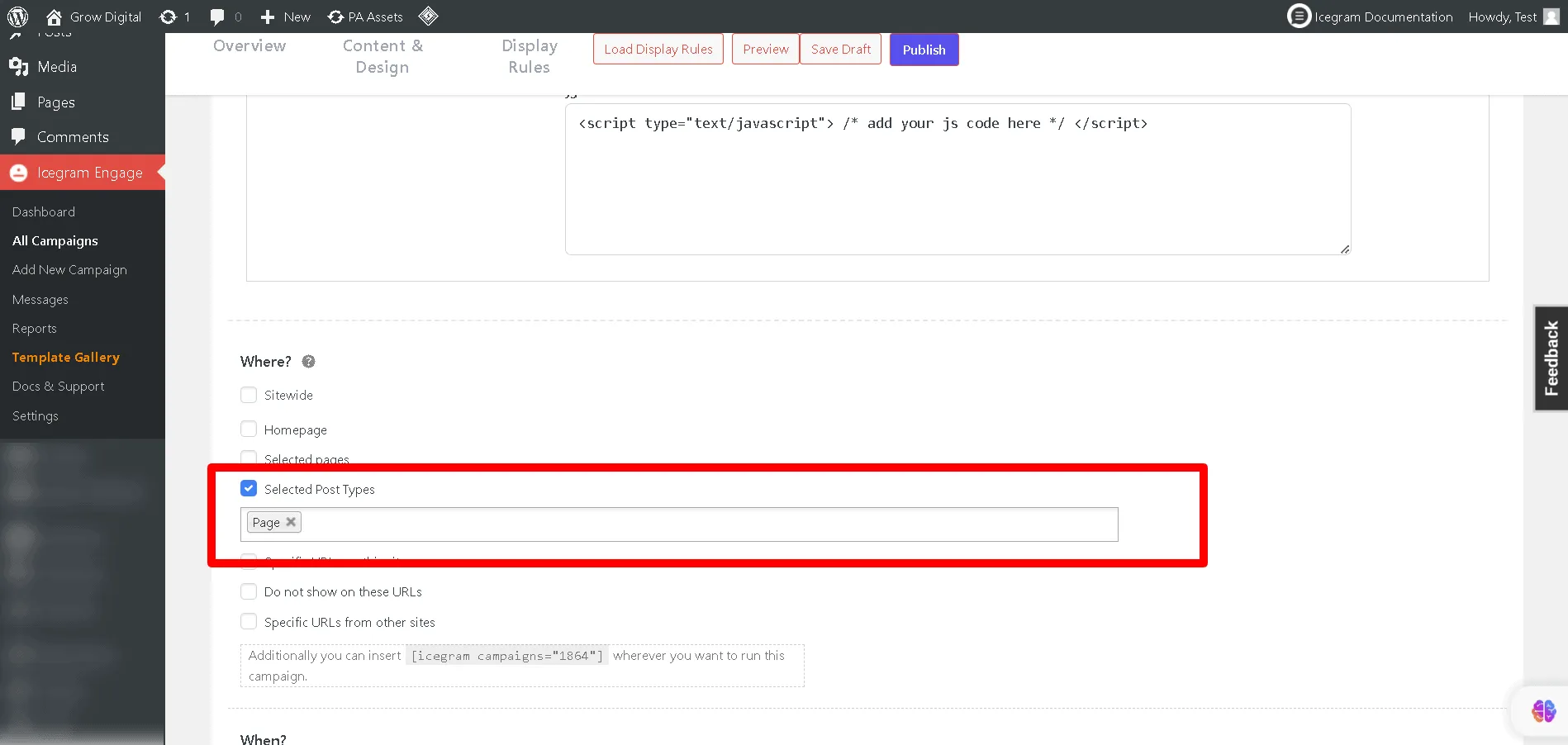
A campaign can be targeted on any page type, such as a shop page, landing page, etc. Using this feature, you can add WildCard functionality to your selected custom pages.
Steps:
Step 1: Create a new campaign/ edit a previous campaign.
Step 2: Fill in the message content.
Step 3: Start filling the display rules. In the 'WHERE' option select "Selected Post Types"
Step 4: Choose the page type you want the campaign to be shown on such as the landing page, Shop or Product page, etc.
Step 5: Fill the remaining rules and click to preview.