
How to Target Icegram Engage Messages On A Particular Category/ Keyword
Display targeted campaigns only on specific WordPress post categories, tags, or custom taxonomy archives.
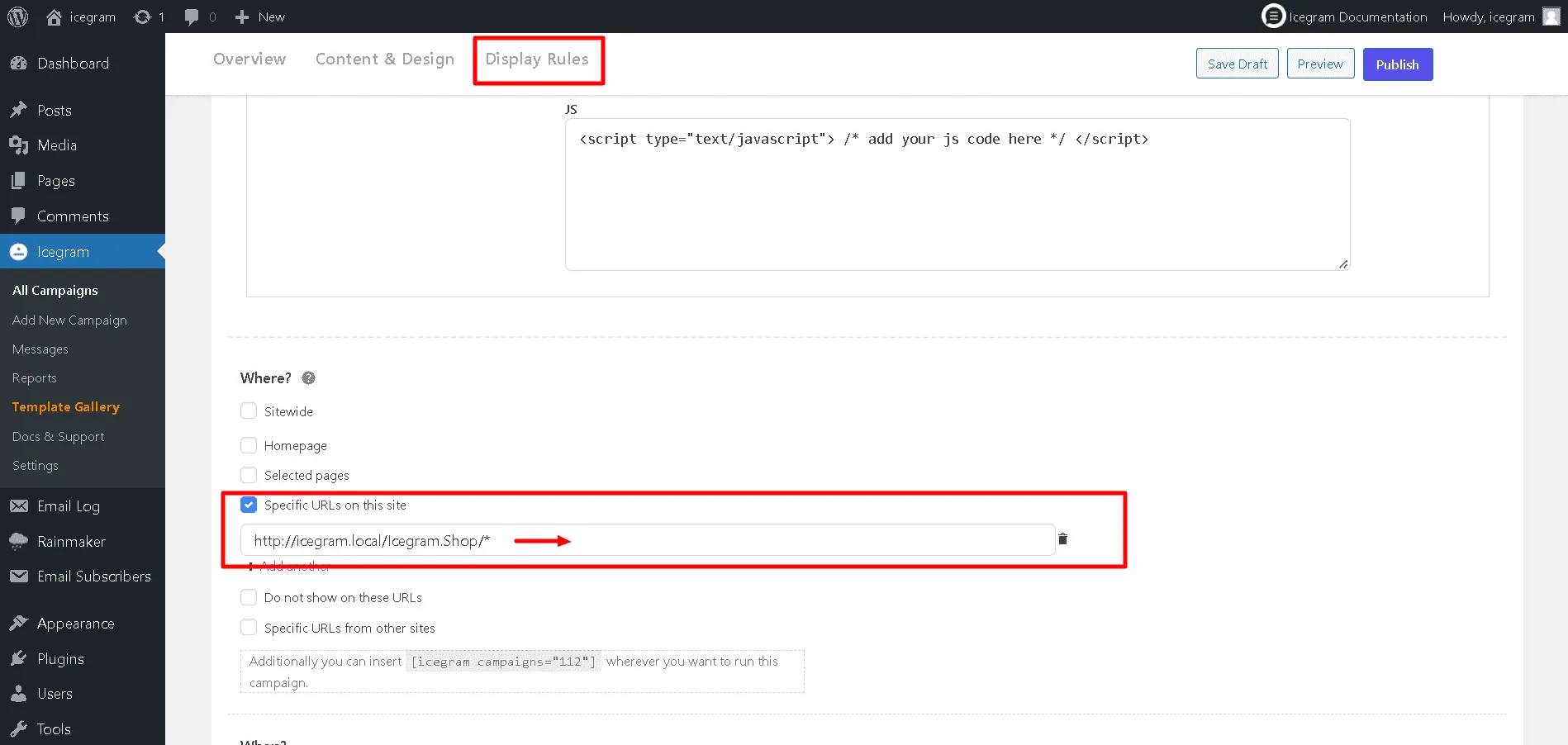
Show Icegram Engage messages on a particular category
For example: Products/ blog
Steps:
Step 1: Open the Campaign that you have already created or simply create a new one
Step 2: Go to the Display Rules >> Where
Step 3: Tick the checkbox that reads: Specific urls on this site
Step 4: Start filing in the url you wish to target the Icegram Engage messages on.
In our case we chose the blog category.
Thus, the url https://www.icegram.com/blog/*
Show Icegram Engage messages depending upon a keyword that appears in the URL
You can target Icegram Engage messages based on certain keywords that appear in the url. A few examples are given below:
http://www.site.com/blog/*keyword*

http://www.site.com/*/keyword/*

http://www.site.com/*/keyword/*

http://www.site.com/keyword/*another-keyword/
Eg. If you want to show your campaign on pages with "Icegram Engage" in their title – and hence the URL, it's very easy. You can display a testimonial of Icegram Engage on all pages that have "icegram" in their URL like this:
http://www.site.com/ Icegram Engage
This will work
on: http://www.site.com/icegram, http://www.site.com/blog/icegram-updates, http://www.site.com/category/icegram-addons – or anything else that has Icegram Engageanywhere in the URL.