
How to Resize a Popup in Icegram Engage
Adjust the width, height, and responsive proportions of Icegram Engage popups to fit your design.
Although there's no popup size adjustment feature built in directly into the Icegram's core, with it's flexibility you just need to add a few lines of CSS to make it work.
Here's the exact step-by-step procedure to resize a popup in Icegram Engage:
Step 1: Edit a campaign / create a new campaign and add a popup as message type.
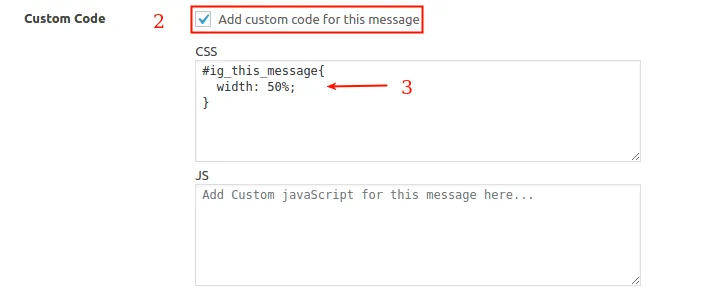
Step 2: Scroll down to the "Custom Code" option, check the box that says "Add custom code for this message". This will open up two textboxes; the above one for CSS and below one for Javascript code.
Step 3: Enter this code into the CSS textbox:
#ig_this_message {
width: 50%;
} 
Step 4: Publish / Update your campaign.